1Install
Heddy works in Chrome, Edge and Safari. Open this page in one of them to install it. Heddy saves into your aitutors.me account, so sign in there in the same browser.
2Pin Heddy
Browsers hide new extensions. Pin Heddy so his icon sits beside the address bar. Click the puzzle piece next to the address bar, then the pin beside Heddy.
Good evening, Maya.
Three things are waiting in your Jotters.
- Click the puzzle piece
- Click the pin beside Heddy
- Heddy stays in your toolbar
3Ways in
Heddy runs on a page only when you ask. There are four ways to ask.
Open the desk
Heddy’s desk opens beside the page: Sources for clipping, and your professor to ask.
Save to Jotters
Right-click words and choose Save to Jotters. On a picture, choose Add picture to Heddy.
Snap a picture
Press Ctrl+Shift+K and draw a box. Press it twice for the whole screen. ⌘⇧K on a Mac.
On YouTube, there’s a fourth: the Watch with Heddy button under every video. See section 6.
4Clip a page: Sources
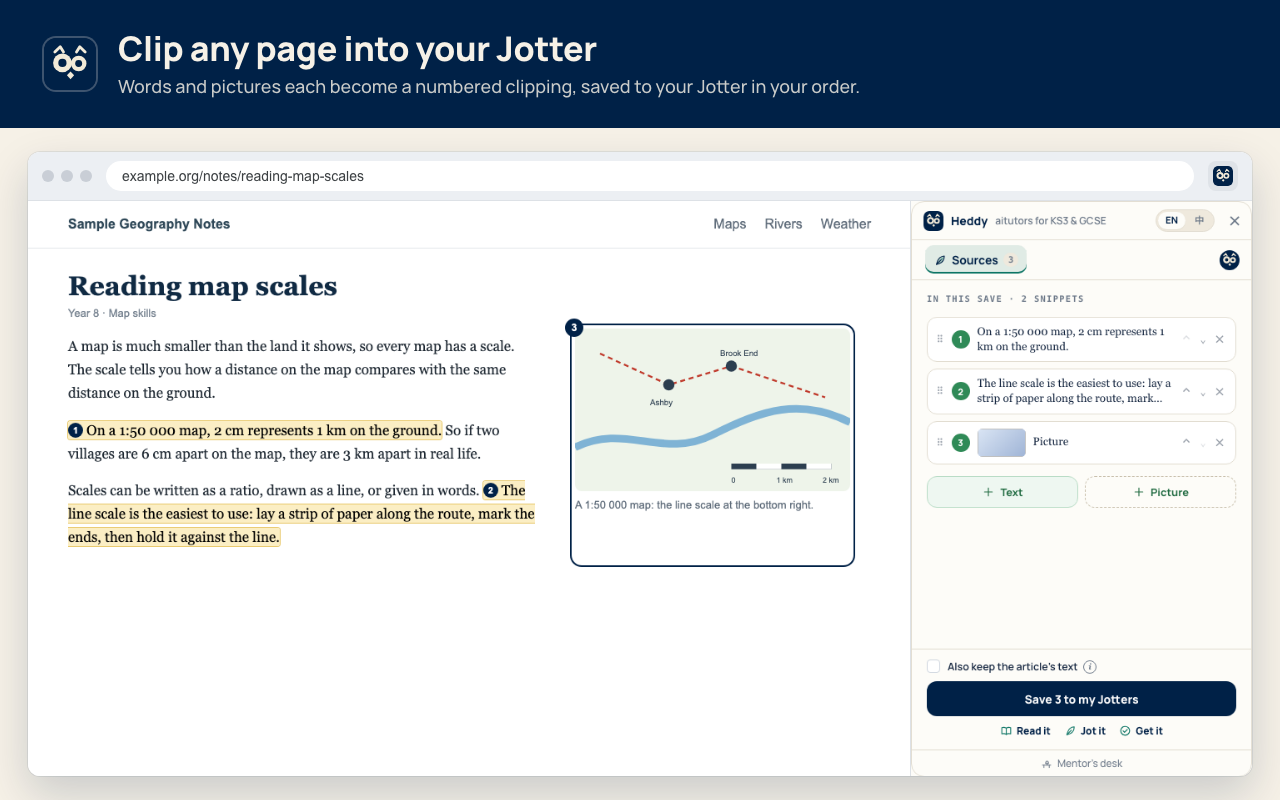
Click Heddy’s icon and the desk opens beside the page. Select words and each selection becomes a numbered snippet. Tap + Picture and draw a box round a map or photo. Keep up to 10 snippets and four pictures from one page, and put them in your own order.
Try it
Click a highlighted line, select any words, or tap + Picture then the map. Then press Save to my Jotters.
Reading map scales
A map is much smaller than the land it shows, so every map has a scale. The scale tells you how a distance on the map compares with the same distance on the ground.
On a 1:50 000 map, 2 cm represents 1 km on the ground. So if two villages are 6 cm apart on the map, they are 3 km apart in real life.
Scales can be written as a ratio, drawn as a line, or given in words. The line scale is the easiest to use: lay a strip of paper along the route, mark the ends, then hold it against the line.
Always check the scale before you measure, because two maps of the same place can use very different scales.
- Save n to my Jotters puts the snippets in your Jotter in that order, with the page’s address.
- Also keep the article’s text saves the headings and paragraphs too, without menus or ads.
- With nothing selected, the button reads Save this page to my Jotters.
5Ask your professor
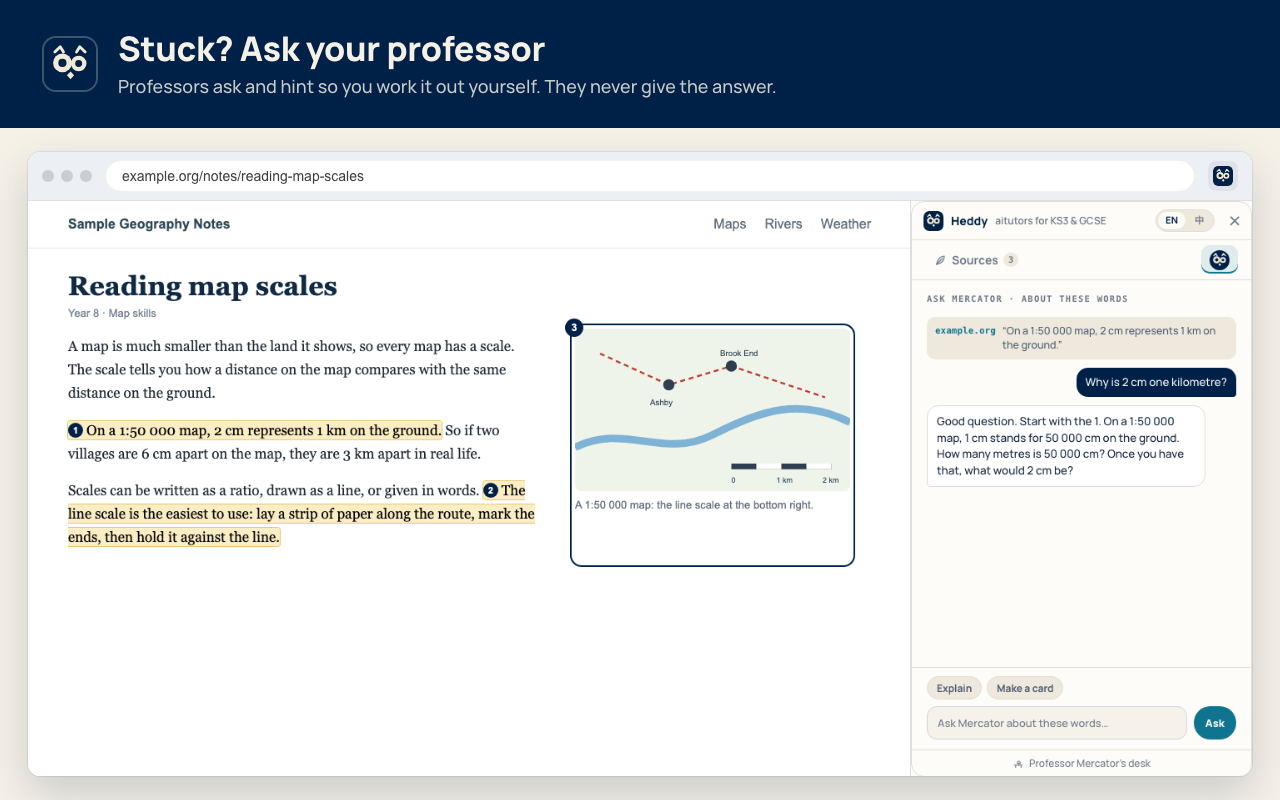
The round crest at the end of the tab row opens Ask. Each subject has its own professor — on a geography page, it’s Professor Mercator. Ask about your snippets, a picture or the whole page. Tap Explain or Make a card for a quick start.
Professors ask, hint and show a worked example of a similar problem. They never give the answer — your answer stays yours to find.
6Watch with Heddy
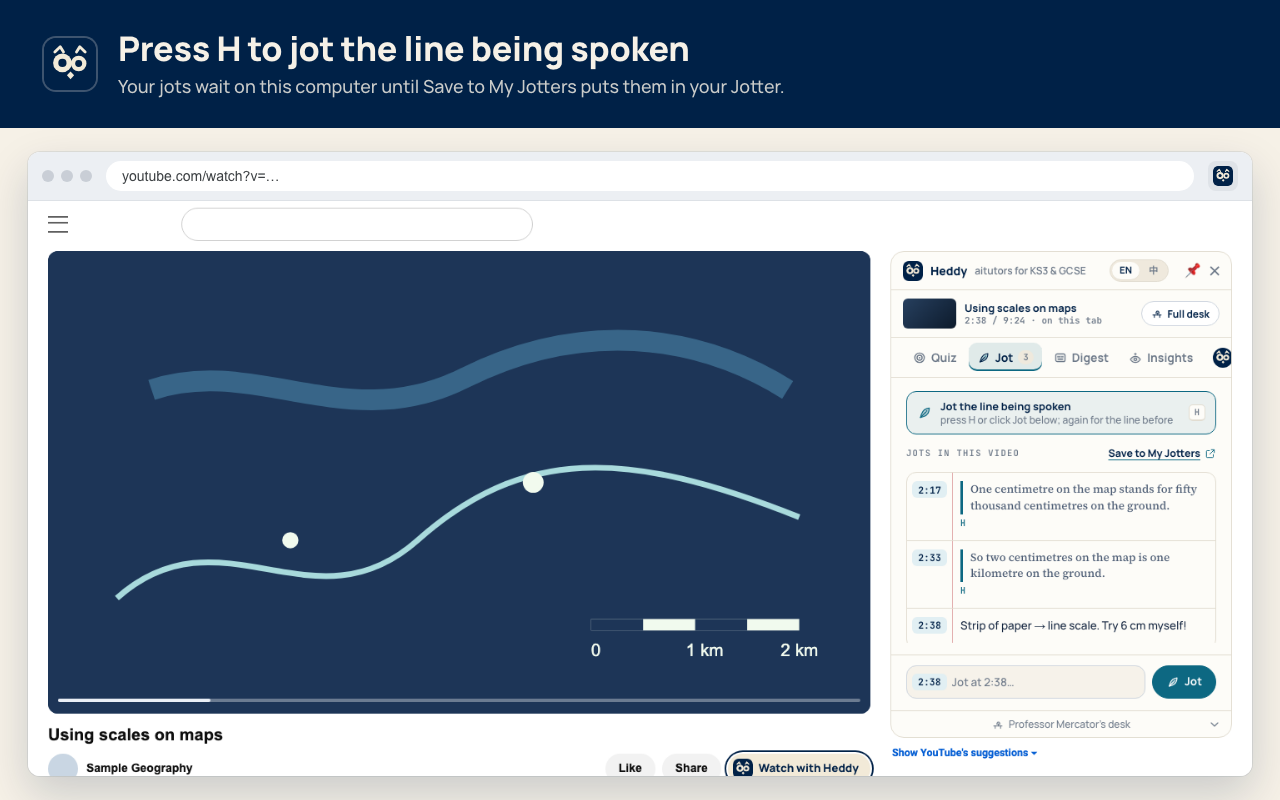
Under any YouTube video, tap Watch with Heddy. The desk opens beside the player with four tabs:
| Tab | What it does |
|---|---|
| Jot | Press H to jot the line being spoken (again for the line before), or type a note. Jots wait on this computer until Save to My Jotters puts them in the video’s Jotter, by their times. |
| Digest | The transcript in English, Bilingual or Chinese, following the player. Tap a time to play from there. |
| Insights | Your professor’s short note on each chapter, as you reach it. |
| Full desk | Opens the video in Classroom on aitutors.me, with your jots. |
Try it
Play the video, then press
Hon your keyboard. Switch to Digest to read along.
Using scales on maps
We only use a channel’s own captions. Heddy never makes a copy of the video to write its own.
7Shortcuts
| Snap a picture | Ctrl Shift K | Draw a box. Twice for the whole screen. |
|---|---|---|
| Jot the line being spoken | H | On YouTube, with the desk open. Again for the line before. |
| Show Heddy’s buttons for selected words | Not set | Set your own key. |
Change shortcuts at chrome://extensions/shortcuts
8Every browser
Chrome and Edge on laptops and Chromebooks. Safari on Mac, iPhone and iPad. There’s no Firefox version yet.
9Schools and privacy
For schools
On a school Chromebook?
Managed devices often block new extensions. Your IT team can allow Heddy in a couple of minutes — send them this.
Extension ID · Chrome Web StoreGoogle Admin console › Devices › Chrome › Apps & extensions › Users & browsers › Add by ID.
Privacy
Reads a page only when you ask it to.
- Heddy runs on a page only after you click its icon, right-click, press the shortcut or tap Watch with Heddy.
- Snippets and jots wait on this computer until you tap Save. Then they go to your Jotter on aitutors.me.
- On YouTube, Heddy uses only the channel’s own captions. It never copies the video.
10FAQ
Where do my snippets and jots go?
Into your Jotters on aitutors.me. Snippets and jots wait on this computer until you tap Save; after a save you can Undo it.
Does Heddy read every page I visit?
No. Heddy runs on a page only after you click its icon, right-click, press the shortcut or tap Watch with Heddy.
I can’t see Heddy in my toolbar.
Click the puzzle piece next to the address bar, then the pin beside Heddy.
Will the professor just tell me the answer?
No. Professors ask, hint and show a worked example of a similar problem. Your own answer stays yours to find.
Can I use the desk in Chinese?
Yes. Switch the desk between English and Chinese in its header. On YouTube, the Digest can show the transcript in English, Bilingual or Chinese.
Is there a Firefox version?
Not yet. Heddy works in Chrome, Edge, and Safari on Mac, iPhone and iPad.
Is it free?
Yes. The extension is free, and it saves into your aitutors.me account.